Showing posts with label DENALI CTP3. Show all posts

Friday, 15 July 2011

Microsoft SQL Server code-named 'Denali' - Community Technology Preview 3 : Data Flow

Below you can find my review on the Data Flow part of CTP 3 which I will extend the next few days.This review is part of an overall review of Microsoft SQL Server code-named 'Denali' - Community Technology Preview 3.

Data Flow

Flexible Authoring
Change in CTP 1: It's now possible to edit a component even when its input path is disconnected.

Simplified Data Viewer
The Data Viewer can now be configured directly from the Data Flow Path editor. The data viewer only supports a grid view, the histogram and scatter plot views have been removed (but who has ever used them?).
An other time saver: just one right and one left click.


I only get a little error message when I execute the task and close the data viewer.
Error message when closing data viewer


Source & Destination Assistant
Added in CTP 1: the Source Assistant and Destination Assistant. Feels a little bit like SSIS for Dummies... and there isn't a flatfile target.
They are extra.


After the OK, you will get the regular screens.


Grouping in dataflow
Very useful for large dataflows is the new collapsible grouping option.
Dataflow grouping


Data Correction / DQS Cleansing
The new data flow object I mentioned in my CTP 1 review is gone (was not yet working there), but a new transformation has been added: DQS Cleansing. Will check it out later on. See also Data Quality Services.
DQS Cleansing


Pivot
I expected a better editor. Unfortunately no improvements yet... See/vote this request at Microsoft Connect.
Still the user unfriendly editor

Microsoft SQL Server code-named 'Denali' - Community Technology Preview 3 : Control Flow

Below you can find my review on the Control Flow part of CTP 3 which I will extend the next few days. This review is part of an overall review of Microsoft SQL Server code-named 'Denali' - Community Technology Preview 3.

Control Flow

New icons
Changed in CTP 1. There are new icons for the tasks with rounded corners. Just nicer!
Rounded corners


SSIS Toolbox
Changed in CTP 1 and change again in CTP 3. They regrouped the items with some new categories. And new custom tasks and components should automatically appear in the toolbox. There are some new tasks (like Expression Task) and some have disappeared (Execute DTS 2000 Package Task, ActiveX Script Task, have you ever used them?). One thing is a little confusing: there is a Toolbox and an SSIS Toolbox available (the first one is empty for SSIS).
SSIS Toolbox


Foreach Loop
Changed in CTP 1. Finally the Foreach File enumerator configuration is instantly visable (personal irritation).
SSIS 2008: where is my configuration?


Execute Package
Changed in CTP 1: ReferenceType has been added to the Execute Package Task. Which you can use to select a package from your current project. If you choose External Reference, you will get the SQL Server / File system choice.
Package Reference Type


Expression Task
With this new task you can fill variables. An activity you probably previously did with a Script Task.
One little weird thing is that you have to name *1 (see picture) the variable that you want to fill in the expression. It would be nicer if you could select the variable in a drop down and then add the expression in a separate field.
Expression Task: Notice the new/extra folder for system variables (*2)

Wednesday, 13 July 2011

Microsoft SQL Server code-named 'Denali' - Community Technology Preview 3

It took Microsoft a while since CTP 1, but CTP 3 has been released this morning and there are some exciting new features. You can read a great review at SSIS Junkie. And you should also read the SSIS Team Blog. Below you can find my review which I will extend the next few days.

Review parts:
General changes
Control Flow changes
Data Flow changes

General

Visual Studio 2010
CTP 3 finally uses Visual Studio 2010. CTP 1 was still using Visual Studio 2008.
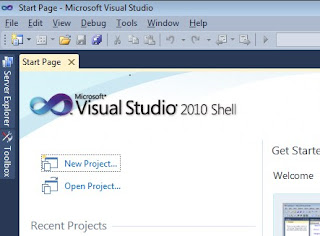
Visual Studio 2010!


Undo & Redo
Added in CTP 1, but probably one of the best new features.
They really work


Cut & Paste
Added in CTP 1. If you paste with your mouse, the item will be pasted at your mouse position instead of somewhere below. This too will make your developer life easier.

Zoom
Added in CTP 1. Very handy zoom function in the lower right corner which fades when not active.


Variables and there scope
The most annoying part of variables was that when you created a new variable the selected task in the Control Flow became the default scope and you where not allowed to change that. Both flaws have been solved!

Although I selected a Foreach Loop Container, the package became the scope!
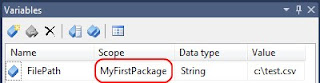
Default scope: the package!


And if you want to use the Foreach Loop Container as a scope, you can use the Move Variable button the change the scope!
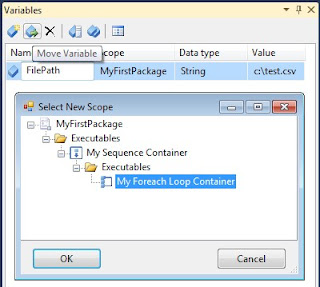
Change scope!


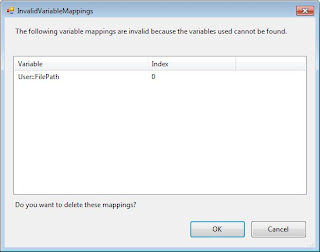
One little bug (?). If you change the scope. The variable will be renamed and the Foreach Loop Container gets an InvalidVariableMappings warning.
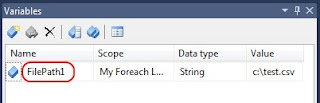
Notice the extra "1"


InvalidVariableMappings


Solution Explorer
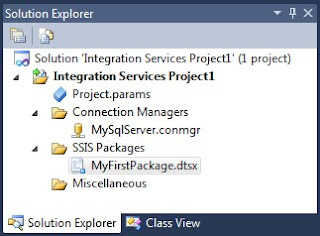
The Solution Explorer has changed. No more Data Sources and Data Source Views. I have used them once in a project I didn't started. So I won't miss them. But they added an Connection Managers item instead. Those connections are available in all packages.
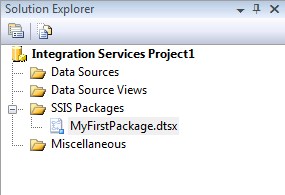
Solution Explorer SSIS 2008


Solution Explorer SSIS Denali CTP 3


If you add a new connection manager in the Solution Explorer it is automaticly added (in bold) to the Connection Managers in the bottum left of your screen.
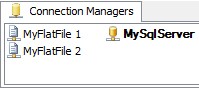
Connection Managers


They also added the Project Parameters to the Solution Explorer. I will review the parameters later on.

New Expressions
The new LEFT expression was already added in CTP 1, but there are two new handy expressions for handling arrays. TOKEN returns the specified occurrence of a token in a string. If the column ColWithArray contains "abc,def,ghi" then TOKEN(ColWithArray,",",2) will return "def" and TOKENCOUNT(ColWithArray,",") will return 3.
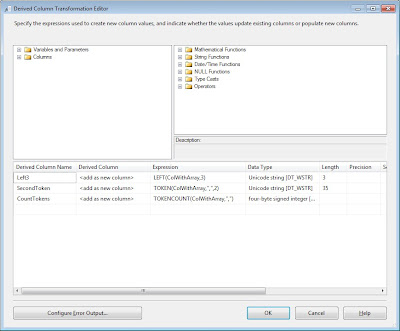
LEFT, TOKEN and TOKENCOUNT


Annotations
You can now use Enter instead of Ctrl + Enter in the annotations, but there is an error when trying to copy and paste (I thought I had already seen that in CTP1, but not sure).
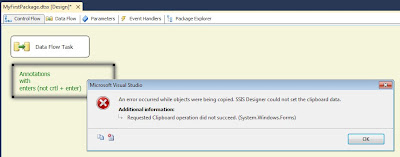
Error when trying copy and paste
Related Posts Plugin for WordPress, Blogger...